
…that works even when filter is applied.

The situation:
We have a table that we would like to apply color banding based on groups. We can achieve this by inserting a helper column to identify the sequence of each group, with the following formula:
In C2, input
=IF(A1=A2,C1,SUM(C1,1)) ‘copy down
and then apply conditional formatting based on the sequence.

Select the range A2:C29, then apply this formula to conditional formatting:
=ISEVEN($C2) ‘note the usage of $
Here’s the result! It works great… until you apply a filter on subset.
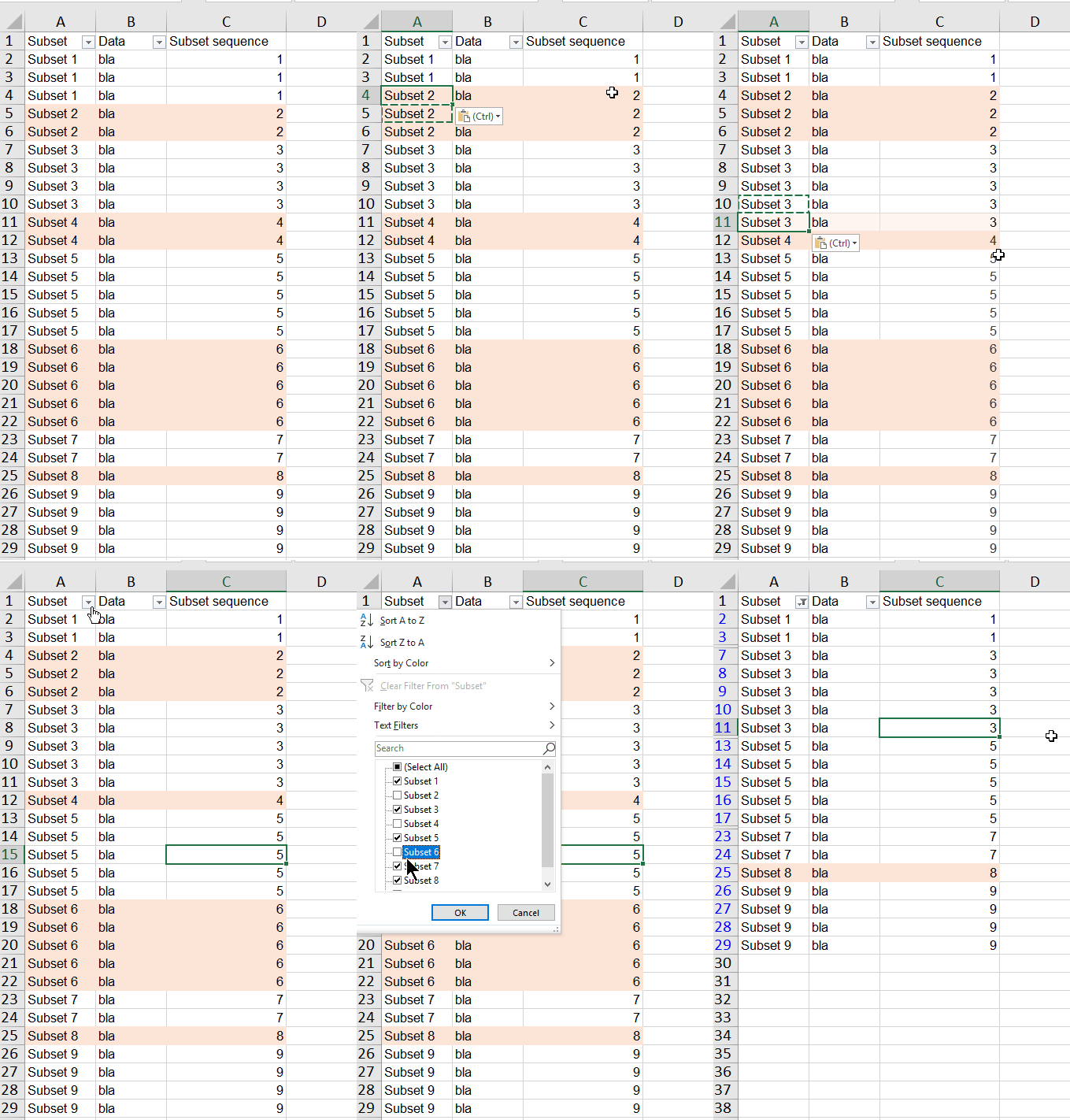
Why is that?
Because we are referring to a static (even) number for the color banding. The number won’t response to the filter. After the filter, only subsets of even number will be highlighted. @_@
The desired result
We want the color banding to be responsive to filter, like the screen cast below:

With some twists to the formula for the helper column, this can be done magically.
You may download Sample File to follow along. Continue reading
















 wmfexcel