Show number in thousand (k) or in million (M) by using custom format

The custom format to show number in thousand or in million is simple:

  • #,##0,“k”
  • #,##0,,“M”

The “k” or “M” is optional, depend on whether you want to show it in the header or in the figure itself.

Excel Tips - Custom Format 1

The trick is to put 1 comma and 2 comma at the end of the format setting (#,##0)Β for “thousand” and “million” respectively.

Nevertheless, do you know how it works? Continue reading

Posted in Excel Basic, Excel Tips | Tagged | 12 Comments

Delete every thing behind the insertion point – Ctrl Delete

Excel Tips - Control Delete 1

Excel Tips - Control Delete 3

The shortest post ever! πŸ™‚

Posted in Excel Tips | Tagged | 3 Comments

Compare two documents for changes – Word and maybe Excel

Excel Tips - Compare docs 1

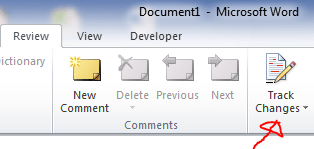
If you use Word, I believe there is high chance that you send out a document to someone for comment, and you expect the receiver would know how to use Β Track Changes in Word, which is a great function to highlight changes made to a document.

Unfortunately, not every one working in office really knows about MS OFFICE. Β You may get a revised file with no hints on what has been revised. Β So what do you do? Put the two document side by side and do eye-ball checking? LOL… Β Β Excel Tips - Compare docs 0

Β (Note: This is a template from Word, i.e. Office.com)

Don’t laugh as that is what I heard and saw. Β It is doable if the document contains only few lines. Β What if we are talking a doc with few pages and even more?

The Compare…Β command in Word Β absolutely save your life. Continue reading

Posted in Excel Tips | Tagged , | 3 Comments

Mouse Tip – Move cell with Shift Key

Excel Tips - Move cells with Shift Drag

If you have read my post about Move Cells with Right Click, you should know it is possible. However for continuous improvement, we often look for faster way to achieve the same thing.  With a simple trick, you may move cells and shift surrounding cells down or right easily:

Continue reading
Posted in Excel Tips | Tagged | 6 Comments

Pay attention when you concatenate – A1 & B1 vs. A1 & “|” & B1

In many case, we may want toΒ combine texts from different cells. Β This can be done by eitherΒ CONCATENATE function or simply an Ampersand &. Β E.g. A1 & B1 & C1 …… We may take it for granted as it looks so straight forward… Well. Β It actuallyΒ depends on the reason for combining texts from different cells. Β If you are doing so because you want to Perform VLOOKUP with 2 lookup values,Β the robust way to combine texts should include a delimiter in between, e.g. A1 & “|” & B1 … Β  Why? Β Because laziness has a price. Continue reading

Posted in Excel Tips, Formula | Tagged , | Leave a comment

Ctrl+Enter won’t let you down!

As you may be aware of, Ctrl+Enter enables you to input the same thing (be it text, value or formula)Β in multiple cells simultaneously. Β See screenshot below for example:

Excel Tips - Ctrl Enter 1

It is quite handy and I use this trick a lot in daily work.

Nevertheless did you know that you may apply the same trick to stay on the active cell after you input a value? Β  Continue reading

Posted in Excel Tips | Tagged | 9 Comments

Fill a series of month-end dates

In many cases, we may want to create a list of month end dates. Β This can be done either by formula or Fill. Β Either way, we shouldΒ input the first month end date (starting date) manually.

Using EOMONTHExcel Tips - Fill a series of month end dates 1

Syntax:Β EOMONTH(start_date, months) Continue reading

Posted in Excel Tips | Tagged , , | 2 Comments

15-significant-digit issue with SUMIF(S), COUNTIF(S), AVERAGEIF(S)

Free Excel Dashboard Webinar

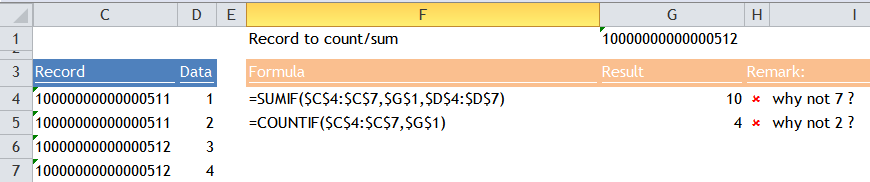
Have you applied SUMIF or COUNTIF to a range that contains numbers with more than 15 digits stored as text? If you did or if you do, you’d better continue to read this as you’ve got wrong answers that you may not be aware of.Β  See example below: Excel Tips - Issues with 15 significant digits 1 Continue reading

Posted in Formula | Tagged , , , , | 10 Comments

Move the Input Message Box out of the way

Did you know that there is Input Message box which look like a comment box?

Excel Tips - Move Input Message out of the way 1

The main difference is your don’t see any “indicator” on the cell. Β The Input Message box pops up when the cell is selected. Β To do this, first select the range of cells you wish to have the Input Message, then go toΒ  Continue reading

Posted in Excel Tips | Tagged , | Leave a comment

In-cell dropdown by Data Validation – Allow input NOT from a list

This is about a trick of using named range that includes a blank cell; which allows any inputΒ even the cell is with Data Validation that allows list.

Excel Tips - Input anything in cell with list data validation 1

When you attempt to input anything other than what is restricted by Data Validation, you will probably see the screen shot above which leaves you basically no choice but “Retry”. Actually there are two ways to get rid of this annoying message and input anything to a cell with data validation. Β Let’s talk about the conventional way first. Continue reading

Posted in Excel Tips | Tagged , | 6 Comments

2014 in review

Originally I have no plan to post until 2015. Β To my pleasant surprise, the WordPress.com stats helper monkeys prepared a 2014 annual report for this blog. Β So why not?

Here’s an excerpt:

The concert hall at the Sydney Opera House holds 2,700 people. This blog was viewed about 41,000 times in 2014. If it were a concert at Sydney Opera House, it would take about 15 sold-out performances for that many people to see it.

Click here to see the complete report.

Sincere thanks to all the visitors who read, shared, and commented this blog. Β Wish you all a Prosperous, Fruitful, and Happy New Year of 2015!

Posted in General | Leave a comment

Merry Christmas 2014

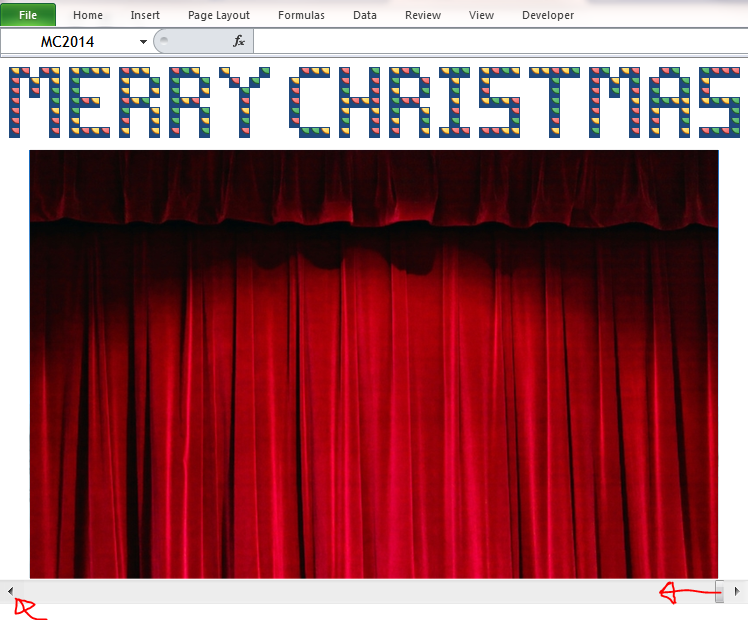
Christmas is all around. Β Here’s a Christmas Card (made with Excel of course) for you! πŸ™‚

Excel Tips - Christmas Greetings 1 Β  ==>Β Excel Tips - Christmas Greetings 2Β ==>Β Excel Tips - Christmas Greetings 3Β ==> Continue reading

Posted in General | Leave a comment

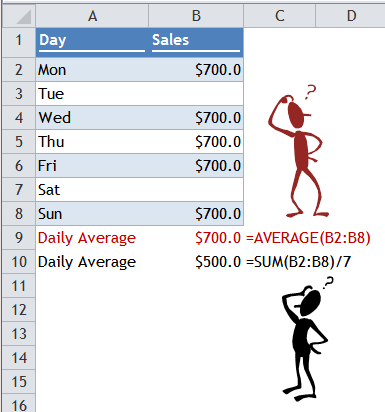
Average Trap 2 – Average the average

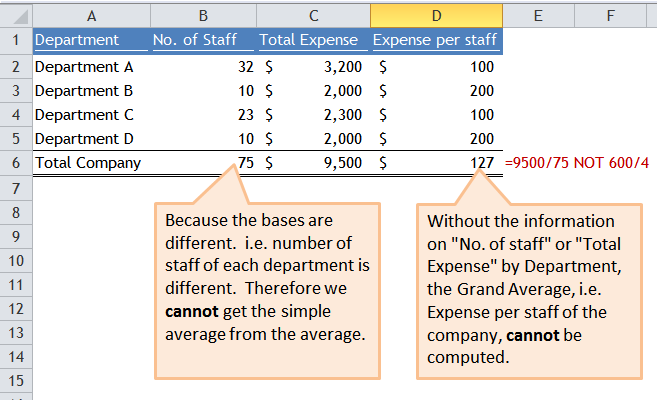
Why we cannot take the average of averages?

Excel Tips - Average the average 1

Once upon a time, I was questioned with the above. Β First thing on my mind: “Is it a test?”… So I answered the question carefully, as shown in the screen shot below: Continue reading

Posted in Formula | Tagged | 1 Comment

News sharing – ActiveX Controls Not Working?

Excel Tips - ActiveX control not working

IF you have no idea of what ActiveX Controls is or IF you don’t even have the Developer Tab on your ribbon, this post may not be relevant to your daily work with Excel; ELSE it is worth taking a look. πŸ™‚

Continue reading

Posted in General | Tagged | Leave a comment

Average Trap

What do you mean by “Average”?

Excel Tips - Average Trap 1

When the question “What is the average of…” is asked, the top of mind function could possibly be AVERAGE.Β  But did you know that AVERAGE function ignores text (including number stored as text), logical values and empty cells??… OMG no? Then you have probably made a lot of mistakes in calculating average in your Excel spreadsheet.

Continue reading

Posted in Formula | Tagged , | Leave a comment

Feel justified with Fill Justify

Like majority ofΒ smartphone users, Excel users (know how to) use only a little portion of functionalities provided byΒ the tool, even though we pay the full price for the tool…

Fill Justify (on the editing group of the Home Tab) is another mysterious tool in Excel that, when discovered, will make youΒ not only fall in love with it; and also feel justified of your investment in Excel.

Excel Tips - Fill Justify

Just in case the above picture is not clear enough, here’s the content in A12:A16

  • A12 – Well, pie is not for charting, it is for eating.Β  Let’s eat one slice of the pie.
  • A13 – OK. You can write whatever comments you want.Β  BUT don’t cross the line beyond column D.
  • A14 And you are not supposed to merge cells as it will alter the row height which make the table on the right look ugly.
  • A15 – What? Why don’t you tell me earlier? Do you know howΒ much time it takes me to convert these four lines into different lines within the boundary of Column D?
  • A16 – Well, I know! It takes about 5 seconds with 3 clicks. Why complain?

Am I serious? Of course. Continue reading

Posted in Excel Tips | Tagged , | 1 Comment

Combine contents in a range of cells into a single cell, with no VBA nor formula.

Excel Tips - Combine texts into one cell 1 Β  Well, the first thing in your mind maybe using ampersand & Β or CONCATENATE to combine them.

  • =A1&” “&A2&” “&A3&” “……
  • =CONCATENATE(A1,” “,A2,” “……) which is more or less time consuming.

Two ways to achieve thisΒ quickly

  • Using a combination of tricks (=Range, F9, Find and Replace)
  • Using Fill –> Justify

Continue reading

Posted in Excel Tips | Tagged , , | 6 Comments

Extract last word from a text string

Excel Tips - Extract last word 1

There are many cases that we may just want the last word from a text string. Β Typical example would be something like the last row in the above screenshot: There are many codes at the end of a text string and we just want to focus on the codes… Β If you need to deal with this, the followingΒ formula mayΒ help you:

=TRIM(RIGHT(SUBSTITUTE(A2," ",REPT(" ",10)),10)) 

Let’s take the text string in A2 “Today is beautiful” for illustration:

A picture can tell a thousand words… Does the picture below give you the explanation? πŸ™‚Excel Tips - Extract last word 2

Continue reading

Posted in Excel Tips, Formula | Tagged , , , | 5 Comments

Date Formats – A trick to format date with “st”, “nd”, “rd”, “th”

Excel Tips - Date Format

Well, there is no such custom format for date in Excel… However it can be achieved indirectly, with helper cell πŸ™‚

Power BI Webinar

Continue reading

Posted in Excel Tips, Formula | Tagged , , , | 17 Comments

Trick or Treat 2014

Today isΒ Halloween. Β Let’s do some funny thingsΒ today.

Excel Tips - Trick or Treat 2015 v1

Have you ever thoughtΒ about to turn your screen upside down? Β To do this, you just need to press CTRL + ALT +↓ Β  Continue reading

Posted in General | Tagged | 2 Comments