What I did during the CNY holiday? To build my 1st dashboard…

During the past CNY holiday, I read a book called <Information Dashboard Design – Display data for at-a-glance monitoring> by Stephen Few.  Special thanks to my friend who borrows the book for me!

Well, this is not an Excel book.  The book basically covers no Excel topic at all.  Instead this book presents various concepts for developing dashboard, which I find quite practical and enlightening!

Continue reading

Posted in General | Tagged | Leave a comment

How to insert picture / photo into comment?

Happy Valentine’s Day!!

Image

Tomorrow is a very special Valentine’s Day as both Chinese and Western Valentine’s Day fall onto the same day.  It happens only once in every 19 years.

Let’s send your special feeling to a special person subtly via a comment in worksheet of Excel.

What? The boring comment in Excel???

Image

No way!!  Did you notice that the (nice) poster on the top of this post is actually a comment?

Continue reading

Posted in Excel Tips | Tagged , | 1 Comment

Why do you turn off Auto Filter and then turn it on again??

Image

I have seen many people turning OFF and then ON Auto Filter in order just to SHOW ALL values (in Excel 2003’s terms) or CLEAR all filters (in Excel 2007 or above’s terms).  Frankly, I think many people do this just for convenience (or laziness).  Some people do this because they don’t know CLEAR (in Excel 2007 or above) = SHOW ALL (in Excel 2003)… well, I was not aware of it when I first switched to Excel 2007 😛

If you are doing it and think that there should not be any problem, you probably are not aware of the risk of it…

Continue reading

Posted in Excel Tips | Tagged | 1 Comment

Time Conversion – How to convert 24hr input as 4-digit number into TIME in Excel?

How to convert something like 1200 into 12:00?

Image

For easy sake of input, we often input 24-hr time as four digit number like 930 for 9:30, 1815 for 18:15 etc.  However, if time is input in this way in Excel, you won’t get the advantage of performing time related calculation, e.g. time difference.

1815 – 900 = 885 instead of 8:45 as per require.

From data entry point of view, inputting time in time format by putting the colon in between hour and minute could be time consuming (comparing to just inputting four-digit number).

Continue reading

Posted in Excel Tips, Format | Tagged , , | 14 Comments

How to lookup only partially-matched value?? – Crazy lookup!!!

This is a real workplace problem.

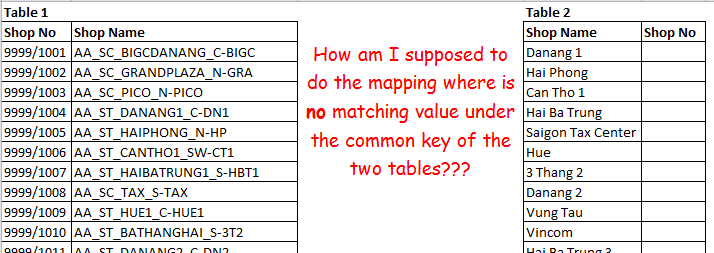
Look at the two tables below, the task was to map the Shop ID from Table 1 (left) to Table 2 (right).  In both tables there is a common key “Shop Name”.  Sound easy? Pls look at the tables first.

Image

The so-called common key appears to be totally different in the two tables.  How could it be possible to do the mapping by formula when the values in the common key are so special??

Continue reading

Posted in Excel Tips, Formula | Tagged , , , | Leave a comment

Alternative to vlookup – Index and Match

Lookup from Right to Left

Image

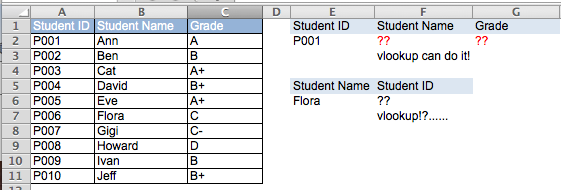
In the above example, if it is given the Student ID, it would be so easy to find one’s corresponding Name and Grade by using vlookup.  However, if we would need to find out the Student ID from one’s name, vlookup fails to help… 😦

I hope my previous posts help you understand vlookup a bit more.  You may be aware of a drawback of vlookup: the direction of the lookup.  It ALWAYS lookups the value from the LEFTMOST column in the table, then return the corresponding value X column(s) to the right.  vlookup CANNOT return a value that is on the LEFT of the lookup value.
Continue reading

Posted in Formula | Tagged , , | 3 Comments

Advanced vlookup – wildcard characters “?” and “*”

Why vlookup gives me wrong answer???

Bugs in vlookup???  I am sure it’s not about text vs. number, but it still fails to give the correct answer!!!
Image

I guess many users are not aware of the wildcard characters in Excel.  That’s why they miss a lot of FUNctionality in Excel.
Continue reading

Posted in Formula | Tagged , , | 27 Comments

How much do I need to pay?

This is not an Excel question…

Image

Just had a happy dinner gathering with friends! Good food, good friend, and good price… 🙂

While a friend was calculating how much to share by each of us, others asked me how to use vlookup for that calculation.  Hahaha, I know that they were kidding!

I said: “We don’t need a vlookup for that (we don’t even need a spreadsheet to do that).  We just need to divide the total amount by the no. of people, right?”

She replied: ummmmm….. I want C to pay half of what the rest of the group pay, that needs a bit calculation…

then she came up with the amount. (I still think that she pays more for us… ;p)

Anyway, we still don’t need a spreadsheet to do that calculation.  As the requirement is one of us pays only half of the rest do, we can do it by the following equation:

C = T / (N x 2 -1) where T is the Total Amount; N is the number of people; C is the amount to be paid by the C

Then how much the rest of the group pay??  Should it be C x 2??? 

Does it make sense?

Posted in General | Leave a comment

Advanced vlookup – Text vs. Number

Why does vlookup not return the lookup value? I am sure it is in the source data table.  I see it by my eyes.
Image
Have you ever experienced this?? That’s normal when you import your data from other database.  Fortunately it can be solved with a little trick.

Continue reading

Posted in Formula | Tagged , , | 14 Comments

vlookup – True or False??

Usually we use vlookup for answering a particular question like “How many customers we had on January 1st 2014?”  We expect an exact match and hence using FALSE as the last argument in the vlookup formula.

When do we use TRUE in vlookup then?

Assigning Grade according to scores is a typical example!
Continue reading

Posted in Formula | Tagged | 12 Comments

vlookup with Match

Hard-coding the col_index_num in the vlookup formula is not a wise choice as you might have to look into the formula and make changes every time you copy and paste your formula.  An alternative approach of marking column index on top of source table was discussed in the previous post.  However using MATCH function should be a better approach.
Continue reading

Posted in Formula | Tagged , | 8 Comments

Tips in constructing vlookup

Tips in constructing vlookup

We talked about the syntax of vlookup and we had written a vlookup formula successfully in the previous post.  YEAH!

Image

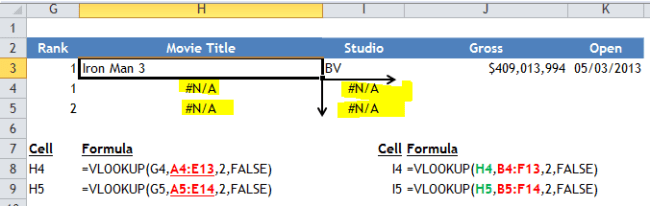
Now we want to ride on the formula by copying it DOWN and to the RIGHT so that we could extend the vlookup for other ranks.  However, all we get is “#N/A”… why????

Simply because we forgot to give Dollar to the formula so that it did not perform in the way we wanted.

Image

Tips for writing vlookup:

Continue reading

Posted in Formula | Tagged | 5 Comments

The basic of vlookup

vlookup – Something you should know about

The basic of vlookup

Definition of LOOKUP (http://www.merriam-webster.com/dictionary/lookup)

:  the process or an instance of looking something up;especially:  the process of matching by computer the words of a text with material stored in memory

v, in the vlookup, means vertical.  Together it means looking something up vertically!

so… What does vlookup do?
Continue reading

Posted in Formula | Tagged | 10 Comments

Excel Basic – Calculation Options

Excel Bugs:  my worksheet does not calculate when I change the variable of a formula???

Don’t panic! It’s most likely that the Calculation Options has been turned to Manual.

Calculation Options – Automatic vs Manual

In Excel 2007 or above, it’s under Formula Tab of the Ribbon.  In Excel 2003, go to Tools->Options->Calculation
ImageThis is a screenshot of Excel 2011:Mac

A story of mine: 

Even after more than a decade, I still remembered how silly I was at an Excel test for a job interview…

Continue reading

Posted in Excel Basic | Tagged | Leave a comment

Use Format Painter to decorate your spreadsheet

Christmas is all around.  Perhaps you are busy with decorating your Christmas tree with lots of joy.

However it’s no joy to decorate your Excel worksheets in your daily work.  It could be really time-consuming to apply the same set formats (note the “s”) into different tables.  What a repetitive and boring task!  If you have this feeling, there is a high chance that you do not know Format Painter, which is a very good assistance in Excel.  🙂

Image Are you aware of this little icon (in Excel 2003 or before)?

Continue reading

Posted in Excel Basic, Format | Tagged , | Leave a comment

Where did I save this file???

One day, a colleague suddenly asked me: “do you know where I saved this file?” by showing me her monitor with the file opened…

Well, the first thing came to my mind was…… well……, input this formula in any blank cell: =INFO(“directory”)

Image

See!  So simple…  But I didn’t do that because that could be too advanced???
Continue reading

Posted in Excel Basic, Excel Tips | Tagged | 2 Comments

Excel Basic – Looks can be deceiving

Once upon a time, I was questioned about the accuracy of calculation in Excel just because one saw a formula “3% x 100” (A1*B1) yielding a result of 2.5 (C1).  WHY????

Image

As a basic but important rule, DO NOT trust what you see at the first sight in real world as well as in Excel.

What you see in a cell does not have to be what it is actually.  What you see in a cell could be a makeup someone puts on it.  A makeup makes the cell look nicer; or even turns the cell into something else totally.
Continue reading

Posted in Excel Basic | Tagged | 1 Comment

Where is the formula referring to???

This is an extension of my post – Teleport in Excel

I don’t remember  how many times I want to know where a formula is actually referring to, esp. when I need to spot what’s the formula doing.  If the worksheet is small, it’s manageable.  When the worksheet is huge or many sheets are involved, I wish I know a way to go to the range in a formula quickly in order to understand what the formula does.  Wait… do the techniques discussed in “Teleport in Excel” help?  Of course!  🙂 Continue reading

Posted in Excel Tips | Tagged | 2 Comments

Quickly delete/hide records (rows) with Strikethrough format by using Find and a couple of simple techniques.

Quickly delete/hide records (rows) with Strikethrough format by using Find and a couple of simple techniques.

I had encountered a file with thousands of records (rows) that keeps track of details of different jobs.  Finished jobs were identified by Strikethrough format.  In other words, records without Strikethrough are unfinished jobs requiring our attention.

The challenge is…. Tens of hundreds of records (rows) with strikethrough are sitting irregularly in between of records (rows) without strikethrough.   Can you imagine how difficult it is to focus on unfinished jobs? Continue reading

Posted in Excel Tips | Tagged , | 15 Comments

Calculating % Change is so easy… to make a mistake!

How to calculate percentage change with negative number?

I believe calculating percentage change should have a very top ranking on the most frequently used calculations in spreadsheet.  Agree?

For me, I often simply do the calculation with a simple formula:  “=After/Before – 1” which is a simplified form of “(After-Before)/Before”.

It sounds alright…… only if you are not dealing with negative number!!
Continue reading

Posted in Excel Tips, Formula | Tagged | Leave a comment