
Why we cannot take the average of averages?
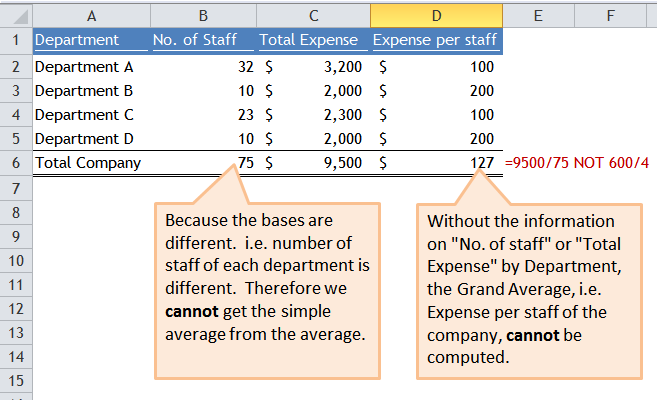
Once upon a time, I was questioned with the above. First thing on my mind: “Is it a test?”… So I answered the question carefully, as shown in the screen shot below:
I think this is quite basic and straight forward. Isn’t it? To my surprise, it is not. Many people would take simple average for averages or rates. Here’s another example: 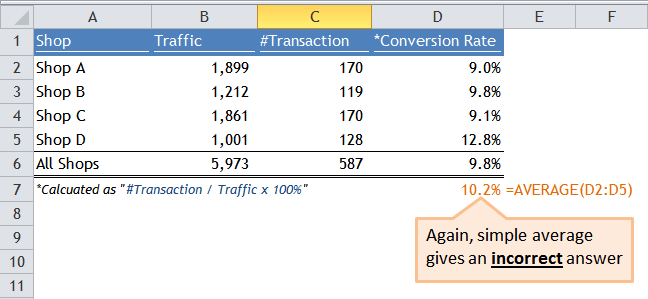 To get the correct answer, we have to find out the total number of Transactions, then divided it by total number of Traffic. Simple average would NOT give you the grand average for this kind of data. If the components (Traffic or Transaction) are missing, there is no way we can get the correct conversion rate for all shops.
Tips: If you are using Pivot Table to summarize the above information, DO NOT use the field “Conversion Rate” directly. You have to do it by Calculated Field.
Mind the average trap for various “Rates”. Did you experience or witness this kind of trap in your workplace? Feel free to share with us in the comment.
Different people have different definitions of “Basic”. Don’t take “Basic” for granted. 🙂






 wmfexcel
Pingback: Average Trap | wmfexcel